Castle Live TV

Castle Live TV is the section of the free Castle app that streams news, sports, music and entertainment channels in real time. It works like a cable box in your pocket, with channels sorted by language and category.
On match days, cricket streams move to the top of the sports row, so fans can follow every over from a phone, TV or laptop. You need no set top box, no dish and no paid channel pack to open it. This guide covers the channel categories, live cricket, setup on each device, the best settings for smooth streaming and fixes for common problems.
| Live TV info | Details |
|---|---|
| Channel groups | News, sports, entertainment, movies, music, kids, devotional |
| Languages | Hindi, English, Tamil, Telugu, Malayalam, Kannada, Bengali, Marathi, Punjabi |
| Live sports | Cricket, football, kabaddi, tennis and more |
| Devices | Android phones, Android TV, Firestick, PC with an emulator |
| Best connection | Wi-Fi or 4G and above |
| Price | Free, with an optional Premium plan |
What Is Castle Live TV?
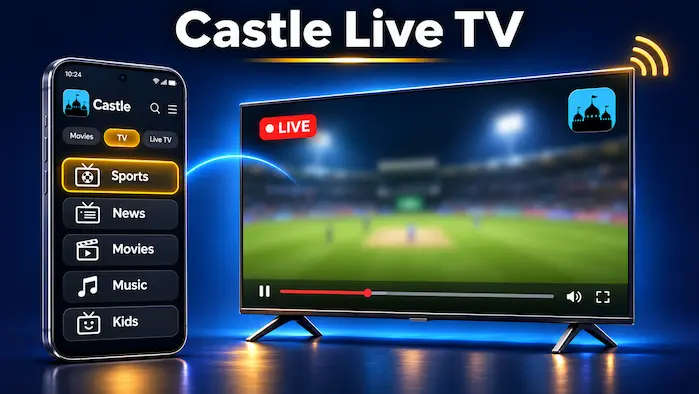
The live tab sits next to movies and web series inside the same app. Castle live TV shows channels that play in real time rather than titles you pick on demand. You can scroll through groups, tap a channel and start watching within seconds. The player supports quality changes, so you can match the stream to your network speed. For many families, it replaces a basic cable or dish connection for news and everyday viewing.
Channel Categories
Channels are sorted into clear groups, which makes it easy to jump to what you want. Here is what each group holds.
News Channels
Hindi, English and regional news channels sit together in one group. You can follow national headlines, state news and business updates through the day. The news row in Castle live TV is handy during big events, when you want updates on the go.
Sports Channels
The sports group carries cricket, football, kabaddi, tennis, wrestling and more. During big tournaments, the most watched streams move to the top of this row. Highlights and replays often appear after a match ends.
Entertainment Channels
General entertainment channels with serials, reality shows and talk shows fill this group. Viewers who missed a telecast can catch the next one live without waiting for a repeat.
Movie Channels
Movie channels play films round the clock in Hindi, English and regional languages. They are a good pick when you want something on in the background without choosing a title.
Music Channels
Music channels stream the latest songs, old classics and regional hits. Many users keep Castle live TV music channels running at home through the evening.
Kids Channels
Cartoon and kids channels sit in their own group, apart from adult content. Parents can also set basic content filters in the app settings.
Regional Channels
Tamil, Telugu, Malayalam, Kannada, Bengali, Marathi and Punjabi channels each have their own rows. Setting your preferred language in the Me tab moves these Castle live TV channels to the top.
Live Cricket on Castle
Cricket is the biggest reason Indian viewers open the live tab. On match days, Castle live TV places cricket streams at the very top of the sports row, so you do not need to search. You can follow international matches and domestic leagues as they happen, with commentary in Hindi or English on many streams. Highlights and short replays often appear in the same row once a match ends. For the best Castle live TV experience on a busy match night, pick a quality one step lower than usual to avoid buffering when traffic peaks.
Official broadcast rights for most major cricket events in India belong to licensed platforms. If you want the guaranteed official broadcast, with stable streams and no blackouts, a licensed app remains the safest choice.
How to Watch Live TV on a Phone
Watching Castle live TV on a phone takes a few taps once the app is installed.
- Open the app and tap the TV tab at the bottom of the screen.
- Choose a group such as Sports, News or Entertainment.
- Use the language filter to show channels in your language.
- Tap a channel to start the stream.
- Tap the screen and open the quality menu to match your connection.
Add your favourite channels to a list by tapping the star or plus icon. They will then appear at the top of the TV tab every time you open it.
How to Watch Live TV on a Smart TV
A big screen makes live sports far more exciting. The TV build of the app shows a full screen channel guide that you move through with the arrow keys on your remote. Install the TV version, open the Live TV section from the side menu and pick a group. Use a LAN cable or the 5 GHz Wi-Fi band for the steadiest picture. Castle live TV on a large display works best at 720p or 1080p on a fast connection.
How to Watch Live TV on a PC
Computer users can stream live channels through an Android emulator such as BlueStacks or LDPlayer. Install the emulator, add the APK and open the TV tab just as you would on a phone. A laptop screen and external speakers make cricket nights feel much bigger. For full setup steps, see our Castle App for PC: Windows and Mac Guide. Turn on virtualization in your BIOS to keep Castle live TV smooth inside the emulator.
Best Settings for Smooth Live Streaming
Live streams need a steadier connection than movies, since there is no time to buffer ahead. Use Wi-Fi when you can, and keep your phone or TV close to the router. On mobile data, choose 480p for a good balance of picture and data use. Close other apps that use the internet, such as downloads or video calls, while you watch. Turn off battery saver, because it can slow the stream in the background. On big match days, lower Castle live TV quality one step before the first ball to stay ahead of the rush.
Data Use for Live TV
Live streaming uses data in the same way as on demand video. These figures are rough estimates for one hour of watching.
| Quality | Best for | Data per hour (approx.) |
|---|---|---|
| 360p | Weak signal, low data packs | 250 MB to 300 MB |
| 480p | Normal 4G on a phone | 500 MB to 700 MB |
| 720p | Fast 4G, tablets | 1 GB |
| 1080p | Wi-Fi, 5G, Smart TVs | 1.5 GB or more |
A full cricket match can run for many hours, so plan your data pack before a long game. Wi-Fi is the best option for full matches.
Castle Live TV Not Working? Problems and Fixes
Most live streaming problems have simple causes. Find the issue that matches yours and follow the fix below it.
Channel Will Not Load
A single channel can go offline for a while, even when others work fine. Try another channel in the same group, or come back to it after a few minutes. Updating the app also refreshes the channel list.
Stream Keeps Buffering
Buffering on Castle live TV almost always points to a slow or busy connection. Lower the quality to 480p or 360p and switch to Wi-Fi if you can. Close other apps that use the internet in the background.
Stream Lags Behind the Real Match
Live streams run a few seconds to a minute behind the actual event. This delay is normal and comes from encoding and network travel. Avoid score apps if you want to keep the suspense.
No Sound on a Channel
Check that your media volume is up and your phone is not on silent. Some channels carry more than one audio track, so open the audio menu and pick another. Restarting the stream often brings the sound back.
Live Tab Is Empty
An empty TV tab tends to mean an outdated app or a failed server connection. Update to the latest build, clear the cache and reopen the app. For a full list of fixes, see our Castle App Not Working? Every Error and Fix guide.
FAQs
Is Castle live TV free?
Yes. Every live channel is free to watch, and an optional Premium plan removes ads and adds better quality on some streams.
Can I watch live cricket on Castle?
Cricket streams appear at the top of the sports row on match days. Pick a lower quality during busy matches to avoid buffering.
Which languages are available?
Hindi, English, Tamil, Telugu, Malayalam, Kannada, Bengali, Marathi and Punjabi channels all have their own rows.
Does it work on a Smart TV?
Yes. The TV build shows a full screen channel guide that works with your remote.
Why does the live stream lag behind the match?
A short delay is normal for every online stream. It comes from encoding and network travel.
How much data does live streaming use?
About 500 MB to 700 MB per hour at 480p, and 1.5 GB or more per hour at 1080p.
Final Words
The live tab brings news, sports, music and entertainment channels together in one free app, with cricket front and centre on match days. Pick a channel group, set your language and choose a quality that suits your connection. Use Wi-Fi for long matches, lower the quality during busy nights and keep the app updated. With these steps, Castle live TV turns any phone, TV or laptop into a live channel guide for the whole family.